

Download Smart Gain – Audio Normalizer, Free Volume Balancer, Secure Audio Tool
Overview
Smart Gain is a lightweight yet powerful audio application designed to automatically normalize the volume level of any media file. Whether you’re dealing with a podcast, a voice‑over, or a music track, Smart Gain analyses the waveform, selects the ideal target loudness, and applies a smooth gain adjustment without re‑encoding the source. The result is a consistent listening experience that preserves the original audio quality.
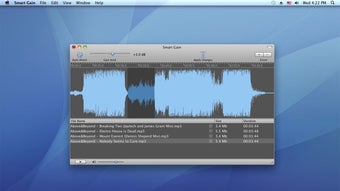
In addition to full‑file normalization, the app offers a manual amplification mode that lets you boost quiet passages or specific fragments to a precise level. Changes appear instantly in the waveform view, giving you visual feedback and fine‑tuned control. Smart Gain’s intuitive interface, zero‑cost download, and cross‑platform support make it an essential tool for creators, editors, and everyday users who want their audio to sound balanced and professional without the hassle of complex audio‑editing software.
Key Features
- Automatic volume normalization using intelligent loudness detection.
- Manual gain control for targeted amplification of quiet sections.
- Real‑time waveform preview that reflects adjustments instantly.
- Preserves original file quality – no re‑encoding required.
- Supports popular audio formats including MP3, WAV, AAC, FLAC, and OGG.
- Batch processing capability for handling multiple files at once.
- Lightweight installer (under 15 MB) and minimal system footprint.
- Free to download with optional premium updates for advanced analytics.
- Cross‑platform availability for Windows, macOS, Android, and iOS.
- Secure download from verified servers with automatic update checks.
Installation & Usage Guide
Step‑by‑Step Installation
Downloading Smart Gain is straightforward. Visit the official website, click the “Download for Windows” (or macOS, Android, iOS) button, and save the installer file. Run the executable on Windows or the .dmg on macOS; the wizard will guide you through the standard acceptance of the license agreement, selection of the install folder, and creation of a desktop shortcut. On mobile devices, tap the App Store or Google Play link, and the app will install automatically.
After installation, launch Smart Gain. The first launch may prompt you to allow access to your media library – this permission is required for the app to locate and open audio files.
How to Normalize Audio
1. Click “Add File” or drag‑and‑drop your media into the main window.
2. The waveform appears, and Smart Gain automatically calculates the optimal target loudness.
3.
Press “Normalize” to apply the gain. The waveform updates instantly, showing the new amplitude levels.
4. Save the file by choosing “Export” – the original file remains untouched, and the normalized version is saved with a suffix “_normalized”.
Manual Amplification
If you need to boost a specific segment, select the region on the waveform, then use the “Gain Slider” or type a decibel value in the “Custom Gain” box. Click “Apply” and watch the selected portion rise to the desired level while the rest of the track stays unchanged. This feature is ideal for improving whispered speech or enhancing quiet musical passages without affecting the overall balance.
Compatibility
Smart Gain runs on Windows 10 or later, macOS 10.14 (Mojave) and newer, Android 8.0+, and iOS 13+. The application uses standard audio codecs, so any device that can play MP3, WAV, AAC, FLAC, or OGG will be fully compatible.
Pros & Cons
Pros
- Free core version with all essential normalization tools.
- Automatic loudness detection saves time and eliminates guesswork.
- Manual gain provides precise control for specific audio fragments.
- No quality loss – original encoding is preserved.
- Supports batch processing for large libraries.
- Cross‑platform availability ensures a consistent workflow across devices.
- Secure download and automatic update notifications keep the software current.
Cons
- Advanced analytics (e.g., LUFS measurement) are locked behind a premium upgrade.
- Batch processing UI could be more intuitive for novice users.
- No built‑in audio effects beyond gain (e.g., EQ, compression).
- Mobile version lacks drag‑and‑drop file handling, relying on file picker dialogs.
Conclusion & Call to Action
Smart Gain delivers exactly what its name promises – a smart, effortless way to bring audio levels into harmony. By combining automatic normalization with a responsive manual gain tool, the app covers the needs of podcasters, video editors, and anyone who wants their recordings to sound polished without investing in expensive DAWs. Its lightweight footprint, free pricing model, and cross‑platform support make it a compelling addition to any audio workflow. If you’re tired of constantly adjusting volume sliders or dealing with inconsistent playback across devices, Smart Gain is the solution that will save you time and improve the listening experience for your audience.
Ready to level up your audio? Download Smart Gain now and enjoy a smoother, more balanced sound instantly.
Smart Gain stands out for its simplicity and effectiveness. The automatic normalization works flawlessly, and the manual gain option offers precise control when needed. While the premium analytics could be more accessible, the free version already provides everything most users require. Overall, a highly recommended tool for anyone seeking consistent audio levels.







